
Allonis Allonis
  • Products
    • Audio
      • Audio Integration
      • Audio Streamer
    • Control & Automation
      • Controllers
        • TVBox Controller
          • TVBox - Overview
          • TVBox Getting Started
        • Rack Modular Server
          • Modular Server - Overview
          • Modular Server - Getting Started
    • Customer Listening
      • Listening Overview
      • Listening Demo
    • Digital Signage
      • Signage Overview
      • Signage Demo
      • TableTopper
      • TableTopper Demo
    • Home Control
      • Control Overview
      • Control Demo
    • Sports Bar System
      • System Overview
      • System Demo
    • Supported Hardware
    • User Interfaces
      • SmartRemote
        • Introduction
      • SmartScreen
      • User Interfaces
        • SmartRemote
          • Introduction
        • SmartScreen
    • Video
      • Mosaic Video Wall
      • Video Integration
  • Solutions
    • Commercial
      • Allonis Commercial
      • Bars and Dining
        • System Overview
        • System Demo
        • Installations
        • Sports Bar Info
          • Project Process
          • Competition
      • Entertainment
      • Fitness Centers
      • Worship
      • Installations
      • Casinos
      • Corporate
      • Point of Sale System
    • Residential
      • Allonis Residential
      • Home Control
        • Control Overview
        • Control Demo
      • How it Works
      • RV / Marine
        • Shelly Relays - RV Slide Control
      • Works With
  • Shop
  • Support
    • Documentation
    • Get Help
      • Warranty
    • Forum
    • Downloads
    • Dealers
    • About
  • Login
Client Support
248-918-0123
Contact Us

DIGISYN AES67 Virtual Sound Card User Manual

DIGISYN VSC Logo

The DIGISYN VSC (AES67 Virtual Sound Card) can send AES67 audio streams in a Windows environment. It requires the use of the DIGISYN LINK3 GUI Controller to manage the routing of audio streams (both unicast and multicast).

DIGISYN LINK Logo

The DIGISYN LINK VSC has currently been tested in mainstream network audio environments, including:

  • RAVENNA

  • Dante

  • Q-Lan

  • Telos

  • Crestron

Features including:

  • Supports 48 kHz and 96 kHz sampling rates

  • Up to 64x64 channels

  • Windows WDM audio format

1. Compatible system versions

This software requires Windows10 or higher, specifically version 22H2 and above.
The best version is Win10 22H2,while newer versions of Win11 may be less stable; Windows11 23H2 and 24H2 cannot guarantee stability.

2. Software Installation

Double-click the installer to install. You can choose the installation language (Simplified
Chinese/English).

Select the installation path and whether to create a shortcut, then continue clicking Next,until the installation completes.

If the firewall is enabled, you need to set the following programs to allow network access:

  • DigisynLinkVSC_V3.0.exe

  • DigisynRoute.exe

3. Language Switching

Click the button in the bottom-left corner of the software to switch languages between Simplified Chinese and English:
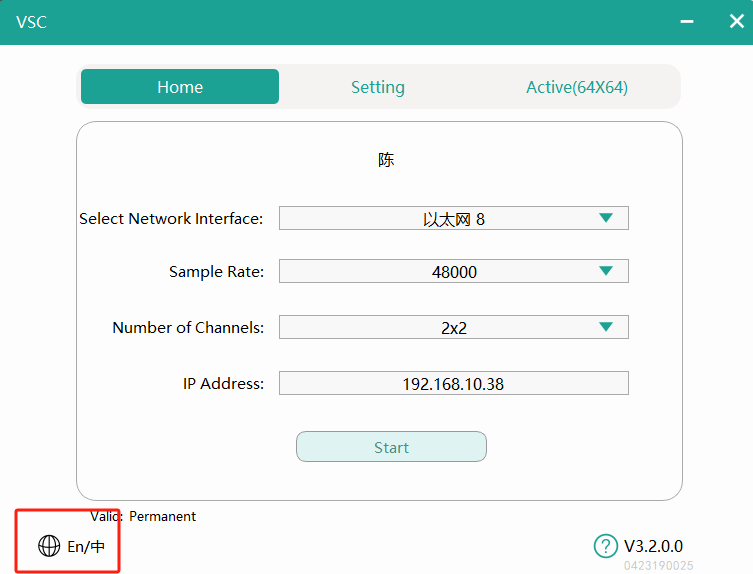
switch language

4. Activation

Click the activation button in the top-right corner of the software to open the activation window. There are two activation methods:

  • Offline Activation:For devices without internet access, copy the machine ID and generate a certificate with the manufacturer for activation.

  • Online Activation:For devices with internet access, use the activation code.
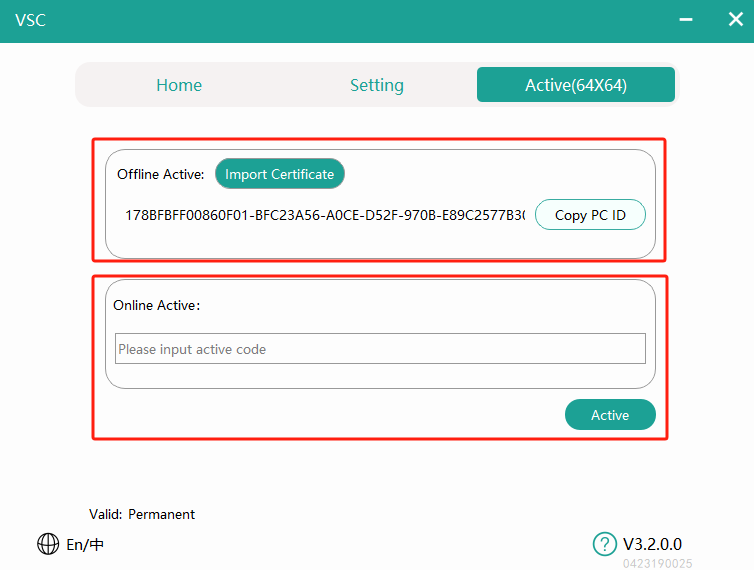
VSC activation page

5. Function Settings

After launching the software, select the corresponding wired network card (only wired network cards are supported,wireless cards do not meet the requirements for ultra-low latency network audio transmission).

  • Select network interface: If there are multiple wired network cards on the host. Note: WiFi networks cards are not supported as WiFi is unreliable and can experience packet loss.

  • Set the sampling rate: (supports 48KHz and 96KHz).

  • Set the number of channels: within the supported range.(from 2x2 to 64x64)

  • Click start: and wait for the software to launch.
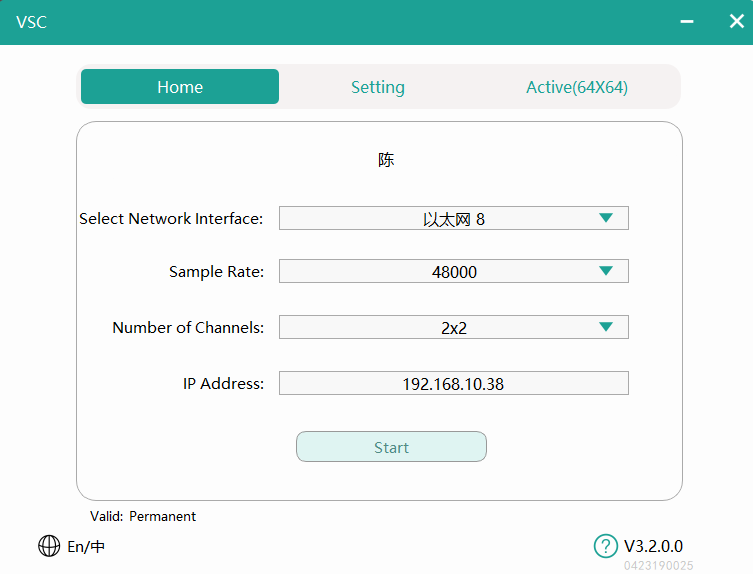
VSC homepage

6. Create and manage unicast streams

You need to use DIGISYN LINK3 GUI controller to create and manage audio streams. For detailed installation and usage instructions please click the link: DIGISYN LINK3 GUI to access the Github repository.

  • To send unicast audio streams using VSC click on the matrix in the DIGISYN LINK controller main routing interface. The left side shows sending devices, and the top shows receiving devices. Click on the sending device labeled VSC (default naming format is vsc-xxxxx-xxxxx as shown in the image:

    VSC Tx device)
    Overlap the channel you want to send from the VSC with the channel of the receiving device by clicking on the corresponding square in the matrix. When a green checkmark √ appears, it indicates that the audio stream has been successfully created.

  • VSC receives unicast audio stream currently only supports receiving sent from DL-04 series network modules / DL-08 series network modules and DSCORE audio workstations. As mentioned, overlap the desired sending channel with the receiving channel on the VSC. Click on the corresponding square in the matrix, and when a green checkmark √ appears, it indicates that the audio stream has been successfully created.

  • To delete a unicast audio stream go to the matrix in the controller main routing interface. Open the channel on the VSC that you want to unsubscribe from and click on the green checkmark √ ,When the green checkmark √ disappears, it indicates that the audio stream subscription has been canceled.

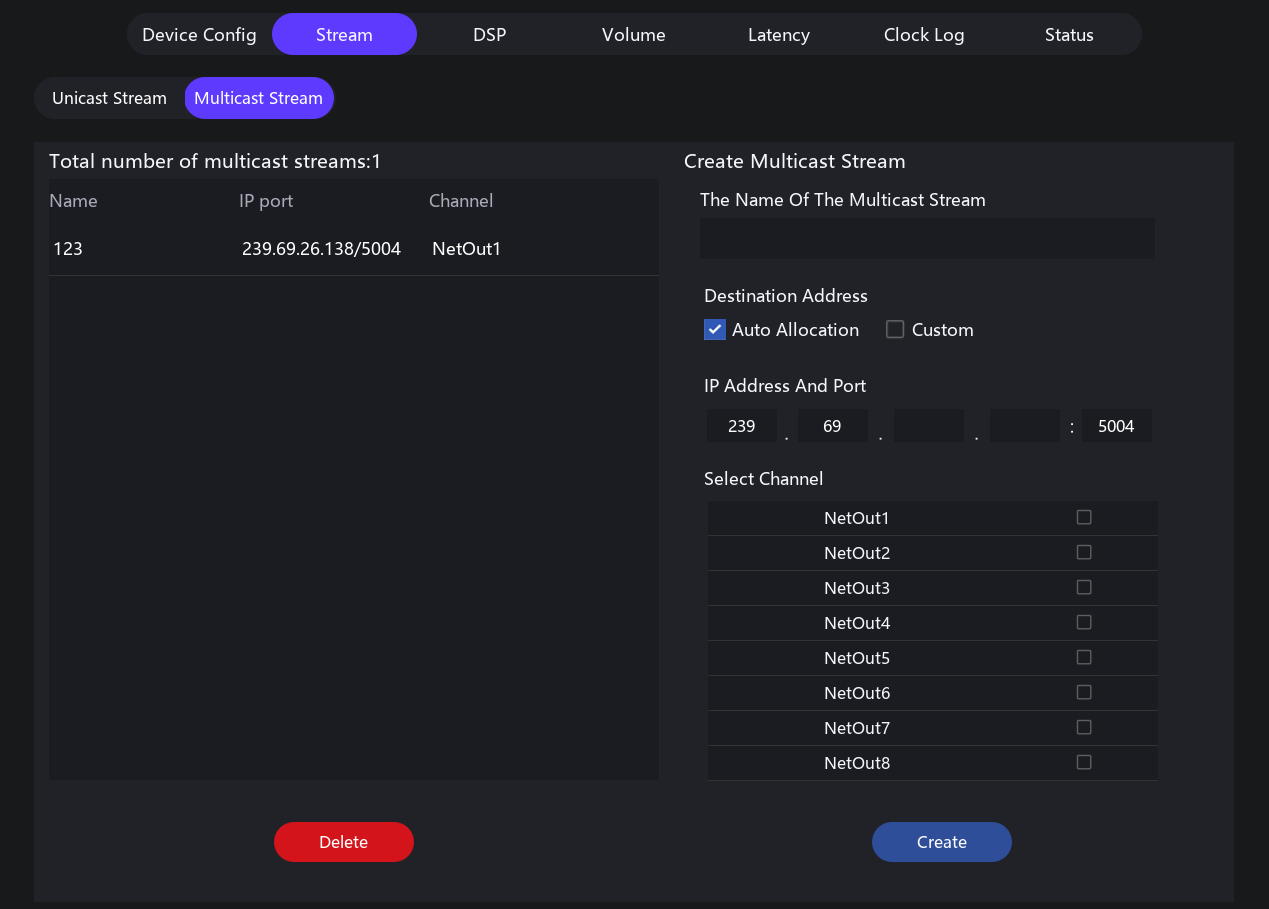
7. To create and manage AES67 Multicast Streams

  • VSC manages AES67 group broadcast audio stream

    • Double-click on the VSC (default naming format is vsc-xxxxx-xxxxx as shown in the image:
      VSC Tx device),Click on Stream,then select the submenu Multicast Stream,After filling in the details, click Create,The main routing matrix will display the created multicast, with the device box colored green, as shown in the image:VSC multicast device

      • Multicast Stream:This page allows you to create, view, and delete multicast streams.

      • Nmae of Multicast Stream:The name displayed after creation, limited to 32 characters.

      • Target Address:The address for the multicast stream you can use automatic allocation or customize the address.

      • Select 'Auto' to automatically assign the destination address and port number. The destination
        address will be assigned according to the RTP prefix configured for the domain in which the device
        is enrolled. For example, if the RTP prefix for the domain is 69, the device will create a flow with destination address of 239.69.x.x. The port number defaults to 5004.

      • Select 'Manual' to specify the address and port. The IP address must be in the range 239.0.0.0 to
        239.254.254.254. The port can be set to any non-administrative port number.

      • Select Channel:The sending channels included in the multicast stream; selected channels can be sent via the multicast stream.

      • Delete:Click to delete an already created multicast stream on the left.

VSC multicast page

8. Other Settings

Click the "Settings" button in the top to open the customization feature page.
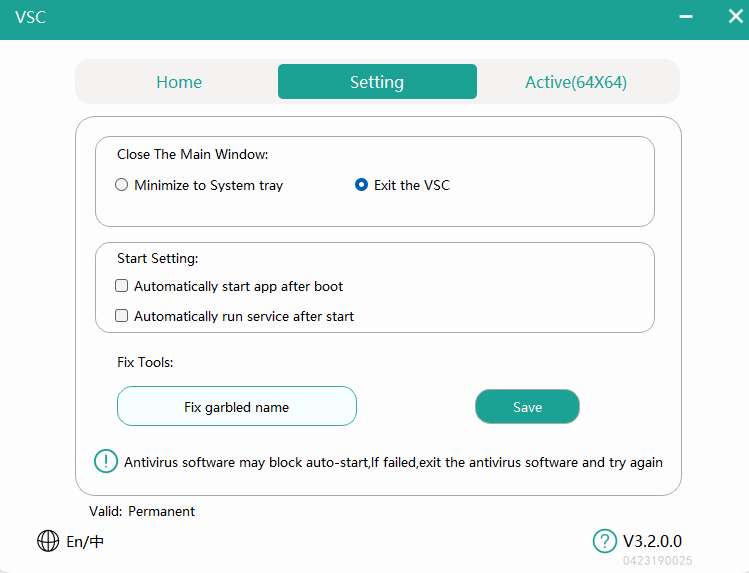
VSC settings

9. Playback and Recording Channel Settings

After starting the VSC, the computer's sound playback and recording list will include the channels of the virtual sound card.

For example, "stereo-01-02" represents stereo channels 1 and 2, corresponding to channels 1 and 2 in the routing controller.
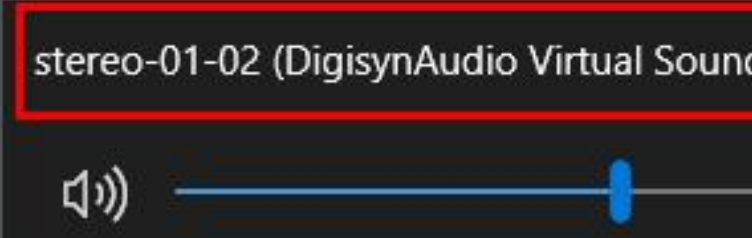
stereo

To play or record sound, select the appropriate channel.

10. Troubleshooting

10.1 Software Window Display Too Large

This may be due to a high system scaling ratio. You can reduce the display scaling by adjusting the system resolution.

10.2 Software Startup Prompt: xxx.dll Library Missing

If you see a prompt about a missing DLL, it indicates that your system lacks the Microsoft runtime library. Download and install the "Microsoft VC++ Redistributable Package" to resolve this issue.

10.3 Software Startup Failure - Check Drivers

Ensure that the necessary drivers are correctly installed. Drivers are automatically installed during software setup, and failure to install them can lead to startup issues.

How to Check:Right-click the Win icon,in the bottom left corner and select Device Manager.
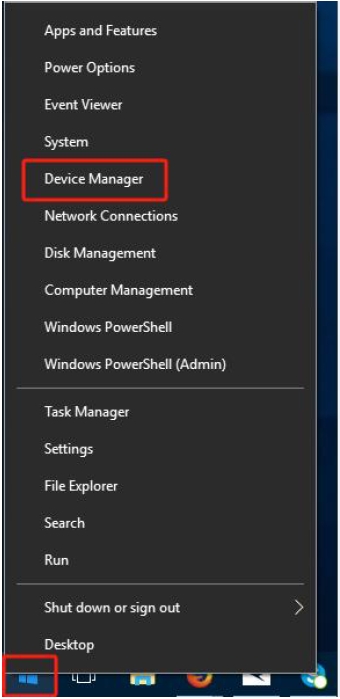
setup

The following image indicates that the driver is functioning normally. If a yellow exclamation mark is displayed, it suggests a driver issue. Try restarting the machine or reinstalling the software.
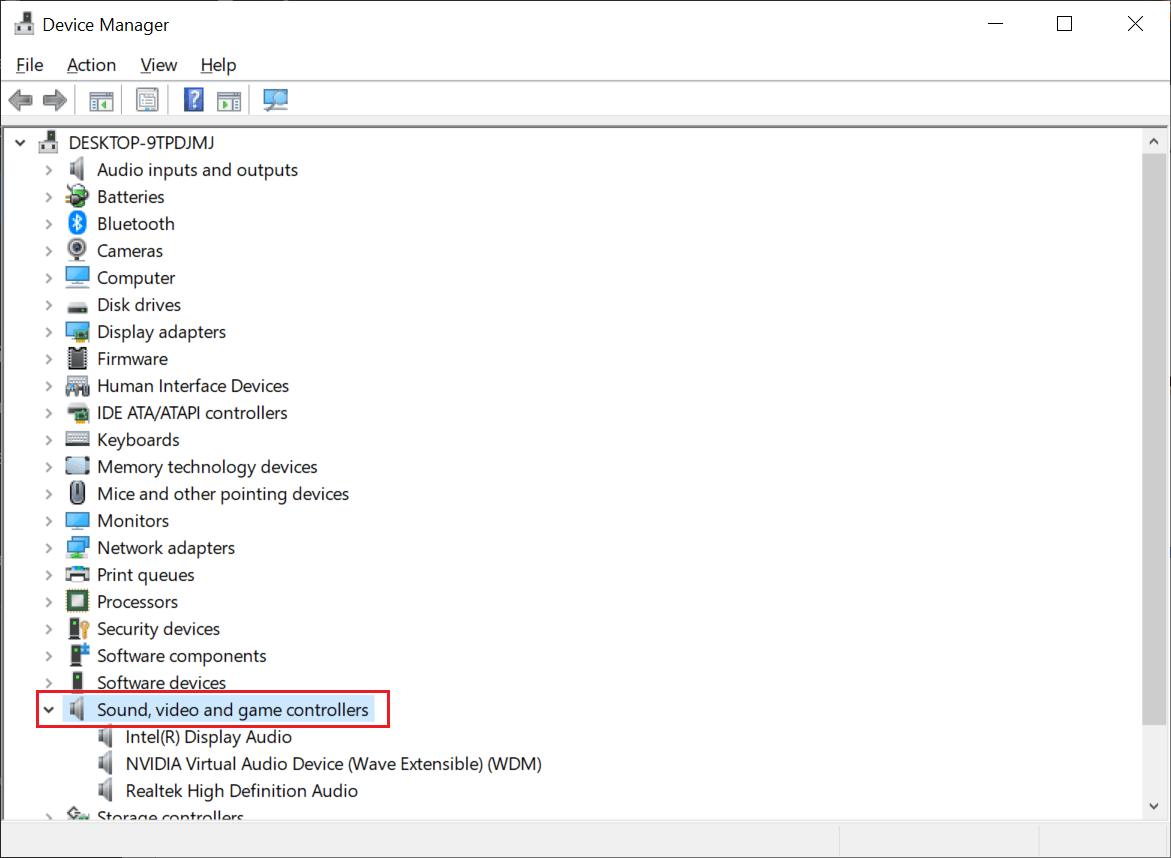
setup

10.4 No Virtual Sound Card Option in Sound Settings

If the computer's playback and recording devices do not find the option for the virtual sound card, open the sound management page and click open sound settings:
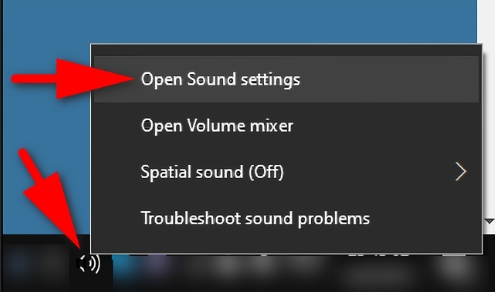
setup

Click Recording to check if the playback and recording pages have the virtual sound card device:
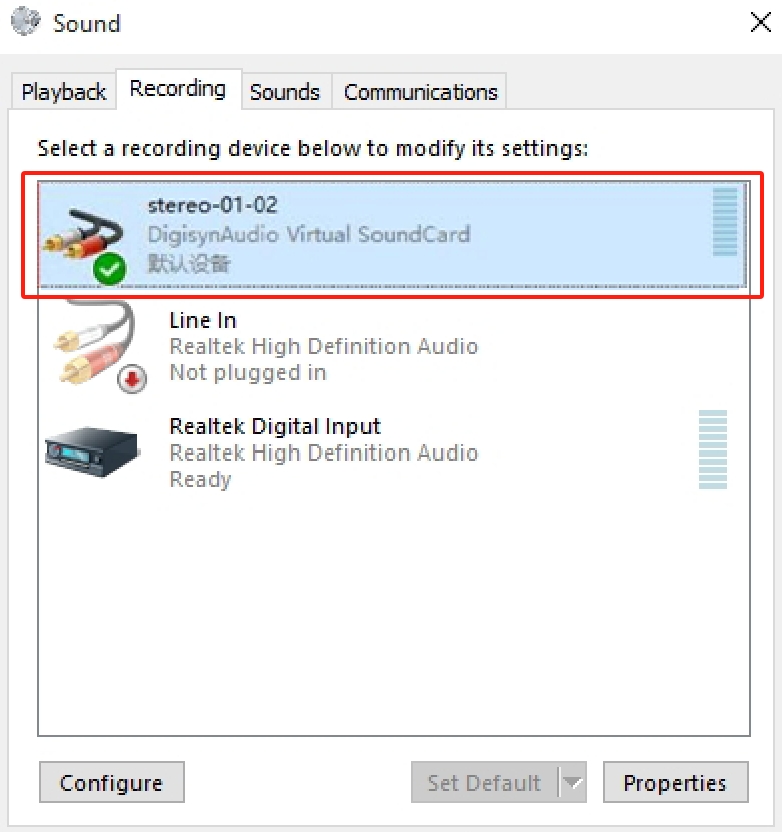
setup

If it exists above but is disabled, right-click to enable it.

10.5 Network Error Prompted During Virtual Sound Card Activation
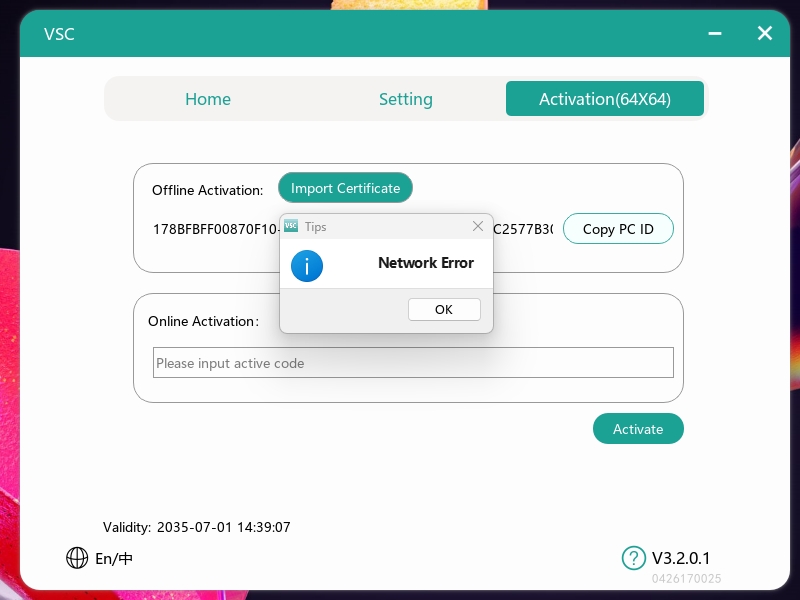
If a network error pop-up appears after entering the activation code and clicking the activate button, perform the following checks:

  • If Windows Firewall is enabled, check if the virtual sound card's activation request is being blocked by the firewall.

  • Check the current network environment to ensure it is stable and working correctly.

  • If third-party antivirus software or network security suites (such as ESET, Norton, Kaspersky, 360, etc.) are installed, check if they are blocking the virtual sound card's activation request.

Search

Documentation
Hardware
SmartRemote1
SmartRemote Screen Protector1
SmartRemote Screen Protector
SmartRemote - Getting Started
Business Related Info
About Us6
Ric Swika
Dr. Jeff Jacob
Dave Perrico - CTO
David Li
Ed Tremko
About Us
Allonis Hardware and Support1
Allonis LLC hardware warranty and support
Become an Integrator1
Become an Integrator
Copyright notices and licenses for Open Source Software1
Copyright notices and licenses for Open Source Software
License Transfers1
License Transfers
Payment Options and other Ordering FAQ1
Payment Options and other Ordering FAQ
Privacy policy1
Privacy policy
Streaming TV for my Bar / Restaurant1
Streaming TV for my Bar / Restaurant
System Licensing1
Getting Started - Trial and Licensed Software
Getting Started
Common Tasks
Audio / Video Integration for Audio1
Audio / Video Integration for Audio
Audio / Video Integration for Video1
Audio / Video Integration for Video
Remote Programming - How it Works1
Remote Programming - How it Works
File Storage FAQ1
File Storage FAQ
Music Streamers1
Music Streamers
myButton: Play an audio file upon pressing a Panic button1
myButton: Play an audio file upon pressing a Panic button
Sending SMS messages from myServer1
Sending SMS messages from myServer
Television Control1
Television Control
Troubleshooting1
4K 60 Hz HDCP 2.3 / 2.2 to HDCP 1.4 Converter / Downgrader1
4K 60 Hz HDCP 2.3 / 2.2 to HDCP 1.4 Converter / Downgrader
Downgrading Linux Kernel
Network Management1
Networking FAQ1
Networking FAQ
Setting a Static IP address1
Setting a Raspberry PI to a Static IP address
Networking - Connect to a Device Default IP address1
Networking - Connect to a Device Default IP address
Accessing myServer from the Internet1
Accessing myServer from the Internet
myServer 6 Router1
myServer Router
myFirewall Installation1
myFirewall Installation
Network Switches1
Network 24 and 48 Port 10G L3 Managed Switch (Rack)1
Network 24 and 48 Port 10G L3 Managed Switch (Rack)
Network Switches
Network Security - myFirewall21
Network Security - myFirewall2
Network Security - myFirewall41
Network Security - myFirewall4
WiFi Router Configuration1
WiFi Router Configuration
QR Code support via myServer 61
QR Code support via myServer 6
VLAN Network Setup1
VLAN Network Setup
VLAN Allonis L3 Switch Network Setup1
Allonis L3 Switches - VLAN Configuration
VLAN Support on myServer 6 Controllers - Raspberry Pi41
VLAN Support on myServer 6 Controllers - Raspberry Pi4
TeamViewer1
TeamViewer
RustDesk Remote Desktop1
RustDesk Remote Desktop
Wifi 2 Ethernet Adapter1
Wifi 2 Ethernet Adapter
Basic Network Setup
myServer 61
myServer Setup
Installation2
myServer Startup2
TVBox Master Image Installation
myServer Startup
myServer Configuration1
myServer Configuration
myServer Configuration - 21
myServer Configuration - Part 2
Sports Bar Project Process1
Sports Bar Project Process
myServer 6 Controller Installation1
myServer - Installation - Pi4
Adding Rooms to myServer1
myServer - Adding Rooms
Adding Lighting1
myServer - Adding Lighting
myServer 6 - Master Image Installation1
myServer Master Image Installation
Find.myServer.fyi1
Find.myServer.fyi
Flashing Pi CM4 using the IO Board1
Flashing Pi CM4 using the IO Board
Migrating to myServer 6 From Previous Versions1
Migrating to myServer From Previous Versions
MultiZone Audio Design - Commercial1
MultiZone Audio Design - Commercial
myServer 6 Installation on Mint OS1
myServer Installation on Mint OS
myServer 6 Installation on Windows OS1
myServer Installation on Windows OS
myServer 6 USB Installation1
myServer USB Installation
Networking Basics1
Networking Basics
Creating a Bootable Image on SDMicro and USB1
Creating a Bootable Image on SDMicro and USB
myServer Virtual Environment Installation1
myServer Virtual Environment Installation
myServer Scheduled Tasks
myServer Master Image Installation TVBox
myServer 6 Automation Events1
myServer Automation Events
myServer 6 Command Syntax1
myServer Command Syntax
Macros - Naming Convention1
Macros - Naming Convention
myServer Backup and Restore1
myServer Backup and Restore
Core System Capabilities
MQTT
Broker
Certificate
Discovery
myServer Device Discovery1
myServer Device Discovery
Testing your Setup
Logging
myServer 6 Hardware
myServer 6 1.5U Rack Mount Hardware1
myServer - 1.5U Rack Mount
myServer 6 Shelf Mount1
myServer - Shelf Mount
myServer Features1
myServer Features
How To
User Interface Scene Transitions1
myServer Scene Transitions How To
Connecting to myServer for Troubleshooting
Advanced Configuration
Authentication
Remote Access
Master Image Updates1
Master Image Updates
3rd Party Automation System Integration
Home Automation Overview1
Home Automation Overview
HomeAssistant Gateway Driver1
HomeAssistant Integration
Homeseer Driver Installation
Node Red - Installation1
Node Red - Installation
Why Automate your Home or Business1
Why Automate your Home or Business
QSC Core Driver1
QSC Core Driver
Applets
TVListings App1
TV Listings - App
Weather App Installation1
Weather App Installation
Drivers1
Amplifiers
Audio Matrix
AES67 Audio IP Networking Overview1
What is AES67?
Allen and Heath Audio Matrix Driver1
Allen and Heath Audio Matrix Driver
Atlas Atmosphere Audio Driver1
Atlas Atmosphere Audio Driver
AVPro ACMax24A Audio Matrix1
AVPro ACMax24A Audio Matrix
BSS-100 Driver1
BSS-100 Driver
DBX - Driver1
DBX - Driver
DBX640 - Driver1
DBX640 - Driver
MonoPrice Blackbird Driver1
MonoPrice Blackbird Driver
MRC88 Audio Matrix Driver1
MRC88 Audio Matrix Driver
QSC Audio Driver1
QSC Audio Driver
RTIADx Audio Driver1
RTIADx Audio Driver
Russound Rio Driver1
Russound Rio Driver
Russound RNET Audio Driver1
Russound RNET Audio Driver
Wiring: Connecting RCA audio jacks to Phoenix Connectors1
Wiring: Connecting audio jacks to Phoenix Connectors
DSP444 AES67 Audio over IP Driver1
DSP444 4x4x4 audio processor
DSP4428 AES67 Audio over IP Driver1
DSP4428 4x4x28 audio processor
AES67 Virtual Windows Sound Card1
AES67 Virtual Windows Sound Card
Audio Video Receivers
Anthem AVR Driver1
Anthem Driver
Denon Driver1
Denon Driver Installation
Integra AV Receiver Driver1
Integra AV Receiver Driver
Marantz AudioVideo Receiver Driver1
Marantz AudioVideo Receiver Driver
Onkyo AVR Driver1
Onkyo AV Receiver Driver
Blinds
Lutron Blinds1
Lutron Blinds
Somfy RS485 Blinds1
Somfy RS485 Blinds
Somfy Synergy UAI+ Blinds1
Somfy Synergy UAI+ Blinds
Somfy Z-Wave Blinds1
Somfy Z-Wave Blinds
TRO.Y Blinds Controller Driver1
Screen Innovations TRO.Y Blind Control Driver
Bond Bridge - Shades1
Bond Bridge
Camera
BlueIris Camera NVR1
BlueIris Camera NVR
Hikvision IP PTZ Camera Setup1
Hikvision IP PTZ Camera Setup
IP Camera Integration1
IP Camera PTZ Driver1
IP Camera PTZ Driver
iP Camera Integration
Lumens Camera Driver1
Lumens Camera Driver
Ubiquiti IP Camera Setup1
Ubiquiti Camera Setup
Samsung NVR Driver1
Samsung NVR Driver
Armcrest IP Cameras1
Armcrest IP Cameras
IPCamera Wyze Integration1
Wyze Camera Integration
Contact / Motion Sensor
Control Device
Harmony Hub Driver1
Harmony Hub Driver
MyQ Garage Door Opener1
MyQ Garage Door Opener
Tablet Power Solutions1
Tablet Power Solutions
Infrared Control1
Infrared Control
UPS Monitor Driver1
UPS Monitor Driver
UPS myServer Pi Driver1
UPS myServer PI Driver
VideoStorm irUSB1
VideoStorm irUSB
Elgato Stream Deck1
Elgato Stream Deck
Shotbox Driver1
ShotBox Driver
Ratgdo Garage Door Control1
Ratgdo Garage Door Control
myIR1 WiFi to Infrared1
myIR1 WiFi to Infrared
myAtom1
myAtom
Energy
AccuEnergy Driver1
AccuEnergy Driver
Fan
Bond Bridge - Fans
Intercom
Keypad
Lighting
DMX Lighting1
DMX Lighting
Lutron Caseta Driver1
Lutron Caseta Driver
Lutron Driver1
Lutron Driver
Phillips Hue Driver1
Phillips Hue Driver
Lighting Sim Driver1
Lighting Sim Driver
Powerline DMX Pool Lighting1
Powerline DMX Pool Light Control
Shelly Automation Device Driver1
Shelly Device Driver
Media Player
Android V2 Driver2
Android V2 Driver
AndroidTV Driver
AppleTV control1
AppleTV control
Blu100 Driver1
Blu100 Driver
BluRay Player IR Control1
BlueRay IR Driver Installation
Cable TV - IR1
CableTV Driver
DLNA Media Player Driver Installation1
DLNA Media Player Driver Installation
Emby Media Server Configuration1
Emby Media Server Configuration
eStream4K Device Using IR1
eStream4K Device Using IR
FireTV 4K Installation1
FireTV 4K Installation
HEOS Driver1
HEOS Driver
Kodi Application1
Kodi Application
Live Streamer Driver1
Live Streamer Driver
MediaMatrix Streaming Media Driver1
MediaMatrix Streaming Media Driver
MediaPlayer Audio Amp1
MediaPlayer Audio Amp
myAudioPlayer1
myAudioPlayer
myMediaPlayer1
myMediaPlayer
Oppo Blu-Ray Player Driver1
Oppo Blu-Ray Player Driver
Roku Player Control1
Roku Player Control
Streaming Media Hardware Comparison1
Streaming Media Hardware Comparison
Streaming Music for Commercial Implementations1
Streaming Music for Commercial Implementations
Sony X1000 BluRay Driver1
Sony X1000 BluRay Driver
Tivo Player Driver1
Tivo Player Driver
Sonos Driver1
Sonos Driver
Zidoo Media Players1
Zidoo Media Players
Xfinity IP Driver1
Xfinity IP Driver
MediaEngine App1
MediaEngine App
Media Service
TuneIn Application
Pool
Jandy Pools1
Jandy Pools
Projector
Optoma Projector Driver1
Optoma Projector Driver
PJLink Driver1
PJLink Driver
BenQ Projector Driver1
BenQ Projector Driver
Mitsubishi Projector Driver1
Mitsubishi Projector Driver
NEC Projector Driver1
NEC Projector Driver
Sony Projector
Vivitek Projector Driver1
Vivitek Projector Driver
JVC Projector Driver1
JVC Projector Driver
Sony VPL Projector Driver1
Sony VPL Projector
JVC LX-NZ30 Projector Driver1
JVC LX-NZ30 Projector Driver
Receiver
Relay
Digital Loggers1
Digital Loggers Relay Driver
Dingtian Relay Driver1
Dingtian Relay Driver
Electronic Salon GPIO Relay1
Electronic Salon GPIO Relay
iMatic Relay Driver1
iMatic Relay Driver
Satellite
DirecTV Driver1
DirecTV Driver
Dish Network Driver1
DISH Network Driver
Security System
DSC Security System Driver1
DSC Security System Driver
ELK Driver Installation and Use1
ELK Driver Installation and Use
Security Simulator Driver1
Security Simulator Driver
Honeywell Security1
Honeywell Security
Outdoor Grill Integration
Traeger Grill Integration
Green Mountain Grill Driver
Sensor
1-Wire Temperature Sensor1
1-Wire Temperature Sensor
GPS Receiver Driver1
GPS Receiver Driver
Water Tank Level Sensing1
Water Tank Level Sensing
Television / Monitor
Controlling TVs via CEC1
Controlling TVs via CEC
Generic TVIR2
Generic TVIR Driver
Infrared TV Control
HiSense TV Control1
HiSense TV Control
NoHassle TV Driver1
NoHassle TV Driver
Insignia TV Control1
Insignia TV Control
LG TV Driver1
LG TV Driver
LGWebOS Driver1
LG WebOS Driver
Samsung BET Driver1
Samsung BET Driver
Samsung Signage TV Driver1
Samsung Signage TV Driver
Samsung Tizen TV Driver1
Samsung Tizen TV Driver
Samsung TV Driver1
Samsung TV Driver
Sony TV Driver1
Sony TV Control
Sharp TV Driver1
Sharp TV Driver
Sunbrite TV Driver1
Sunbrite TV Driver
Viewsonic TV Driver1
Viewsonic TV Driver
PJLink Driver1
PJLink Driver
TCL TV Driver1
TCL TV Driver
Peerless TV Driver1
Peerless TV Driver
Vizio TV Driver1
Vizio TV Driver
Thermostat
Climate Simulator1
Climate Simulator Driver
EcoBee Thermostat1
EcoBee Thermostat
Venstar Thermostat Driver1
Venstar Thermostat Driver
Tuner
Video Matrix
Video Wall Control1
Video Wall Control
AVPro QuadView Driver1
AVPro QuadView Driver
AVPro Video Matrix2
AVPro MXNet Driver
AVPro Driver
ANeuVideo Driver1
ANeuVideo Driver
Brightlink Video Switcher1
Brightlink Video Switcher
Factor A8 Matrix Switch Driver1
Factor A8 Matrix Switch Driver
HDTV HDBaseT Driver1
HDTV HDBaseT Driver
HDTV Video over IP Driver1
HDTV Video over IP Driver
AVOIP 4K Driver1
AVOIP900 Video Over IP 4K Driver
HDMI 36x36 Video Matrix1
HDMI 36x36 Video Matrix
HDMI Matrix Basics1
HDMI Matrix Basics
HDTV HDBitT Driver1
HDTV HDBitT Driver
HDTV Quad Driver1
HDTV Quad Driver
Just Add Power Driver1
Just Add Power Driver
Knox Video Switcher Driver1
Knox Video Switcher Driver
MOiP Video Matrix Driver1
MOiP Video Matrix Driver
Shinybow Video Driver1
Shinybow Video Driver
JTech Video Over IP ZTIP3001
JTech / Zenty Video Over IP IP300 Driver
Connectivity Technologies
CAN Driver1
CAN Driver
Connecting Bluetooth Devices to a Windows PC1
Connecting Bluetooth Devices to a Windows PC
Controlling a Water Valve via Tasmota Relay1
Controlling a Water Valve via Tasmota Relay
DMX
DMX - PKNight Art-Net controller setup1
DMX - PKNight Art-Net controller setup
Art-Net DMX Driver1
DMX - ArtNet Driver
GenericGPIO Relay Driver1
GenericGPIO Relay Driver
Generic Modbus Driver1
Generic Modbus Driver
Generic Serial Driver1
Generic Serial Driver
GlobalCache Driver1
GlobalCache Driver
IFTTT Configuration1
IFTTT Configuration
Infrared Control2
GenericIR Driver
Controlling devices via Infrared
Matter1
Matter - Does it matter?
MQTT Use1
MQTT Use
OBD/VIC Driver1
OBD/VIC Driver
OLA Service Monitor1
OLA Service Monitor
Raspberry BLE Device Driver1
Raspberry BLE Device Driver
Relays - IP controlled1
Relays - IP controlled
Sainsmart IP Relay Driver1
Sainsmart IP Relay Driver
Serial to Net for Pi Installation1
Serial to Net for Pi Installation
Sonoff Devices1
Sonoff Devices
Tasmota1
Tasmota
UPB Lighting Driver1
UPB Lighting Driver
Waveshare GPIO Relay Driver1
Waveshare GPIO Relay Driver
Zigbee Driver1
Zigbee Driver
Z-Wave JSUI Driver1
Z-Wave JSUI Driver
ZWay Raz Driver1
ZWay Raz Driver Installation
ESP32 Projects
ESP32 Doorbell Camera
ESP32 - Rotary Encoder1
ESP32 - Rotary Encoder
Allonis L3 Managed Switch Driver1
Allonis L3 Managed Switch Driver
Atomic IP2IR Driver1
Atomic IP2IR Driver
Drivers
User Interfaces
myDesigner 6
myDesigner 61
myDesigner
myDesigner 6 Installation1
myDesigner Installation
myDesigner 6 Useage1
myDesigner 6 Useage
Administrator Template1
Administrator Template
Modern
Modern Template - Phones1
Modern Template - Phones
Modern Template - Tablets1
Modern Template - Tablets
Moonlight
Moonlight Template Strategy1
Moonlight Template Design Strategy
Moonlight - SmartRemote1
Moonlight - SmartRemote
Moonlight - SmartPhone1
Moonlight - SmartPhone
Moonlight - Tablet1
Moonlight - Tablet
Sheer Template
Sheer Template - Phones1
Sheer Template - Phones
Sheer Template - Tablets1
Sheer Template - Tablets
SportsBar
SportsBar - Tablet1
SportsBar Template - Tablet
SportsBar - SmartPhone1
SportsBar Template - Phones
TV Placement1
Sports Bar TV placement
Browser Compatibility1
Browser Compatibility
Adding Grafana Charting into your UI1
Adding Grafana Charting into your UI
Device Networking1
Device Networking
iPort Surface Mounts1
iPort Surface Mounts
Setting up a Tablet for myServer 6 Templates1
Setting up a Tablet for myServer Templates
Setting up an iPad / iPhone for system access1
Setting up an iPad / iPhone for system access
Tools and Helpers
Developer Tools
Driver Examples

 allonis logo 700

4078 Waterland Drive Metamora, MI 48455

248-918-0123

info@allonis.com

    Copyright © 2026 Allonis. All Rights Reserved.
    Allonis LLC